
Upgrading a Magento 2 / Adobe Commerce store is one of the most challenging tasks for developers. Every version introduces new APIs, deprecations, schema changes, GraphQL updates, and behavior modifications.
A single incompatible module can break the entire upgrade process — resulting in downtime, data issues, and unexpected costs.
To solve this, Adobe created the Upgrade Compatibility Tool (UCT) — an automated analyzer that scans your Magento project and highlights every issue that may break during an upgrade.
This guide covers:
- What UCT is
- Why Adobe built it
- How developers can install & run it
- CLI & PhpStorm integration
- Commands with explanations
- Reporting & filtering
Let’s get started.
What Is the Magento Upgrade Compatibility Tool (UCT)?
The Upgrade Compatibility Tool (UCT) is an official Adobe CLI tool that detects potential breaking changes when upgrading Magento. It scans core, custom modules, themes, and third-party extensions to find:
- Deprecated classes & methods
- Removed APIs
- Breaking changes in core modules
- Backward incompatibility issues (BIC)
- GraphQL & Web API changes
- Database schema diff between Magento versions
- Customization conflicts
- Unsafe overrides or plugins
Goal: Ensure your codebase is ready before you upgrade — saving massive time and reducing risk.
Why Adobe Built the Upgrade Compatibility Tool
Magento upgrades often break because of:
- Deprecated API usage
- Plugins override methods that were removed
- Incompatible third-party modules
- Custom code extending core classes
- Changes in GraphQL or DB schema
Without UCT, detecting these issues manually requires hours (or days) of testing.
UCT solves this by:
- Automating code analysis
- Highlighting issues before upgrading
- Reducing risk of deployment failures
- Helping developers maintain Magento Coding Standards
- Improving upgrade planning & cost estimation
- Decreasing total QA and development time
Developer Benefits
Faster upgrade timelines: Automatically identifies errors instead of manual debugging.
Reduce upgrade cost & downtime: Fix issues before touching production.
Maintain coding standards: Highlights deprecated patterns, API misuse, and bad practices.
Third-party module validation: Check extension compatibility before buying or installing.
Cleaner, more maintainable codebase: Helps keep your project future-proof.
How to Install the Upgrade Compatibility Tool (Linux Friendly)
UCT can be installed anywhere — it does not need to be inside your Magento project.
Step 1: Download the tool :
- composer create-project magento/upgrade-compatibility-tool uct-checker --repository https://repo.magento.com
This creates: /uct-checker
Step 2: Enter directory
- cd uct-checker
Step 3: Allow execution
- chmod +x bin/uct
Your UCT is now ready to use.
Upgrade Compatibility Tool – Main Commands
upgrade: check — Main Command
Scans your Magento instance for upgrade-related issues.
Syntax: bin/uct upgrade:check <magento-root-path>
Useful Options:
--current-version : Define your existing Magento version
--coming-version or -c : Target version you want to upgrade to
--min-issue-level : Filter by issue level (warning/error/critical)
--ignore-current-version-compatibility-issues: Only show new issues introduced by the upgrade
--help : Show all options
-
Example 1 : Scan project using the installed version
bin/uct upgrade:check --current-version 2.4.8-p2 /var/www/html/your-project-name -
Example 2 : Scan module for a specific target version
bin/uct upgrade:check --current-version=2.4.8-p2 --coming-version=2.4.9 /var/www/html/your-project-file-name -
If a target version is not specified
UCT automatically uses the latest version: No target version specified, UCT will run its checks using Magento API version 2.4.9-alpha3 -
dbschema:diff — Compare Database Schemas
Find differences between two Magento versions: bin/uct dbschema:diff <current-version> <target-version>
Useful for analyzing DB changes before upgrade. -
core:code:changes — Compare With Vanilla Magento
Shows changes between your instance and a clean Magento installation: bin/uct core:code:changes -
refactor — Auto Fix Some Issues
UCT can automatically fix a limited number of issues: bin/uct refactor
-
graphql:compare — Compare Two GraphQL Schemas
Identifies breaking GraphQL contract changes: bin/uct graphql:compare <schema1-url> <schema2-url>
-
list - Show All Commands
bin/uct list
-
help - Show Tool Help
bin/uct --help
UCT Output & Report
When you run upgrade:check, UCT will:
- Scan all modules
- Detect critical issues
- Show warnings & errors
- Generate an HTML report
The HTML report includes:
- Filters (Warning, Error, Critical)
- File paths
- Affected modules
- Code lines causing conflict
Perfect for development teams and QA to follow.
Running UCT Inside PhpStorm (Alternative GUI Approach)
While CLI is recommended, the tool can also be configured inside PhpStorm using the Magento PhpStorm Plugin.
Steps to Enable UCT in PhpStorm
- Go to: Settings → Plugins
- Search and install: Magento PhpStorm
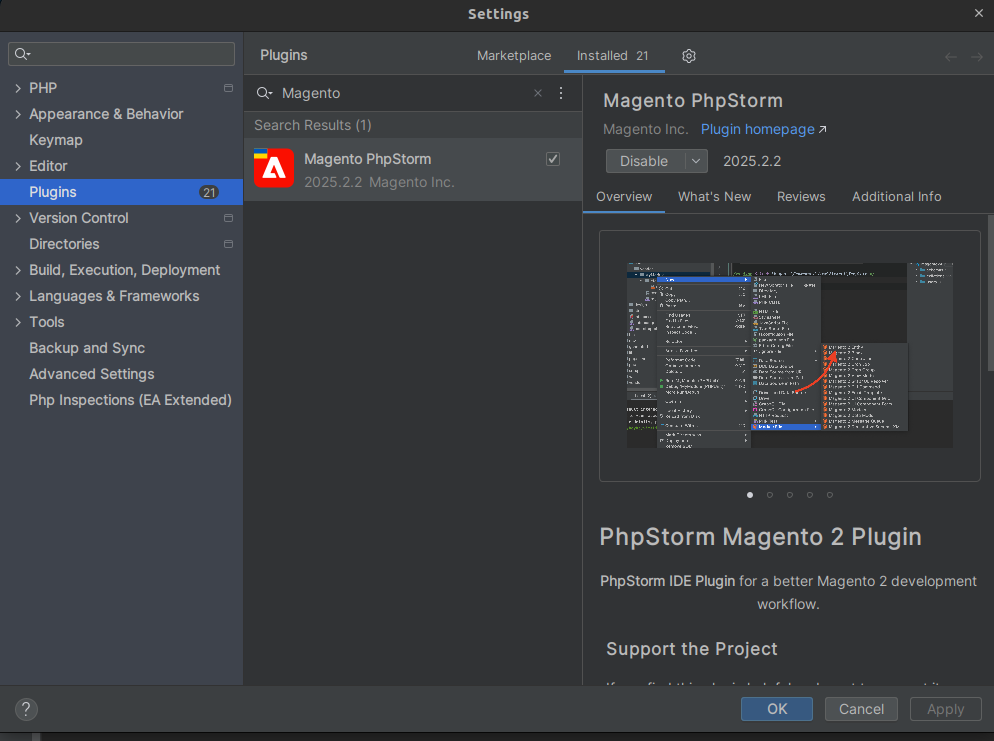
- Restart PhpStorm
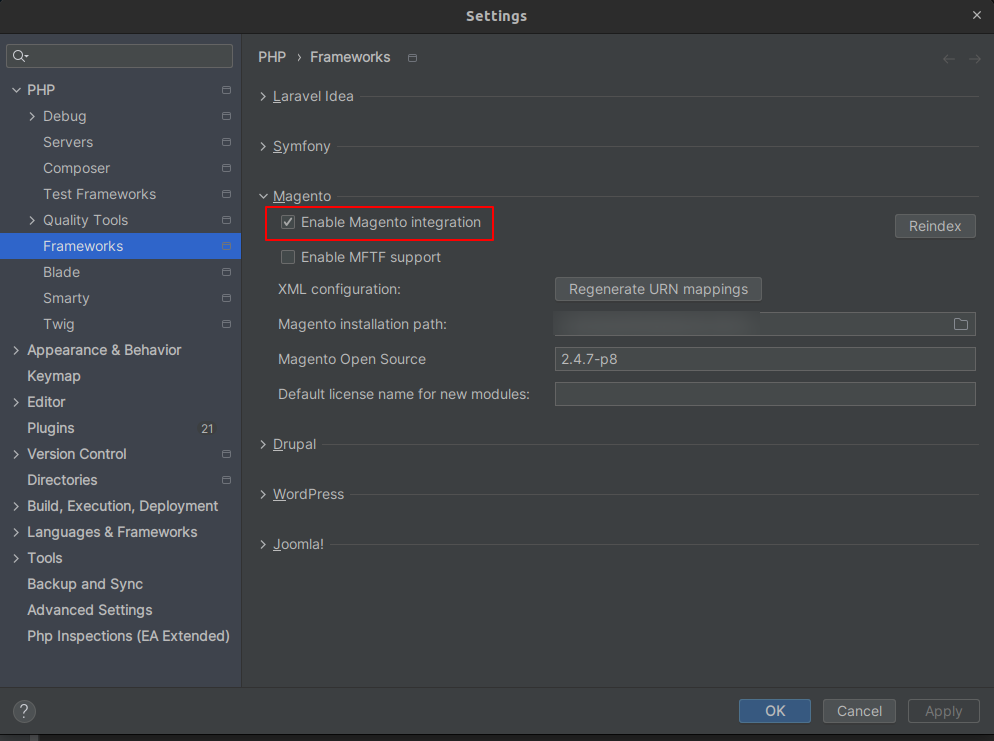
- Open: Settings → PHP → Frameworks → Magento
- Enable "Magento Integration"
- Set your Magento root directory
- Click OK
- After indexing:
Go to Tools → Configure the Upgrade Compatibility Tool
Configure:
- Current version
- Coming version
- Issue levels
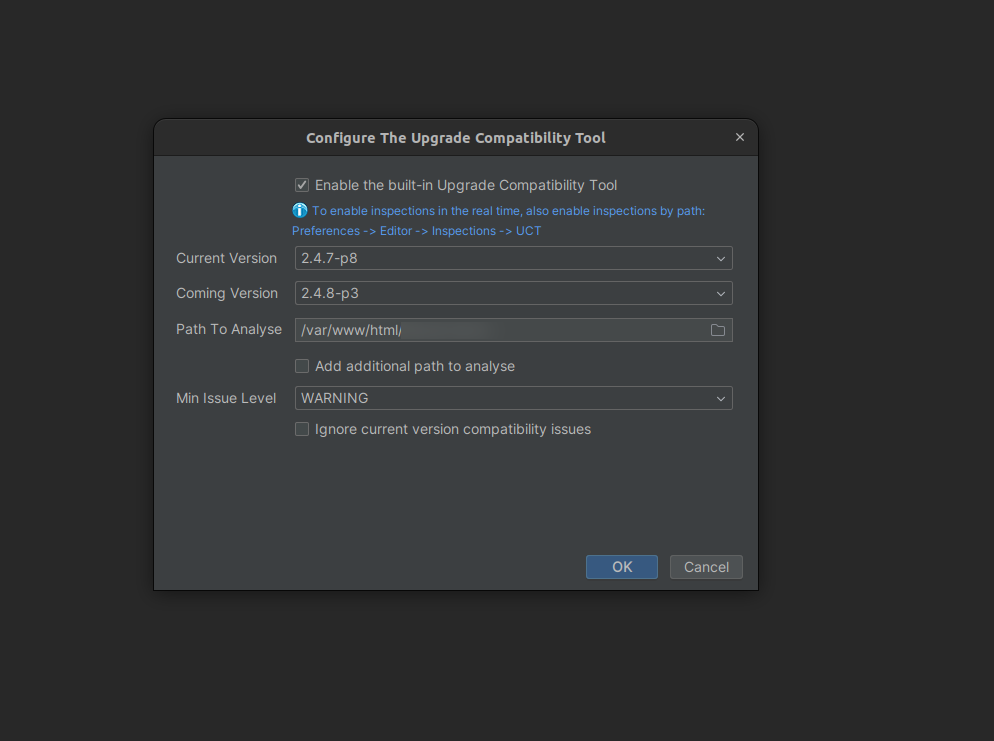
Then run: Tools → Run the Upgrade Compatibility Tool
This enables the tool to run within your IDE.
Note: Running the Upgrade Compatibility Tool (UCT) inside PhpStorm needs high system memory, and low RAM may cause the IDE to freeze or hang. To avoid this, use PhpStorm only for file-level or module-level scans. For full project scans, always prefer using the CLI for faster and more stable performance.
Why UCT Makes Magento Upgrades Faster
Before UCT :
- Update Magento
- Resolve dozens of unexpected errors
- Debug custom code conflicts
- Fix broken third-party modules
- Retest the whole site
- Hours (sometimes days) of developer time
After UCT :
- Predict issues before upgrading
- Fix problems proactively
- Evaluate extension compatibility
- Clean the codebase before upgrade
- Reduce QA failure
This dramatically accelerates the upgrade cycle.
Conclusion
The Upgrade Compatibility Tool (UCT) is a must-use tool for every Magento developer and agency. It eliminates guesswork, reduces upgrade risk, and improves code quality across the entire project.
If your store or your client’s store is planning a Magento upgrade, UCT should always be the first step.
How Evrig Solutions Can Help You Upgrade Magento Faster & a risk-free upgrade assessment?
Our Adobe-certified Magento experts ensure smooth, secure, and efficient upgrades with:
- Zero-downtime Magento upgrades
- Extension & custom code compatibility checks
- Theme & Performance Optimization
- Performance & security enhancements
- Database migration support
With multiple of successful upgrades, we ensure your store runs on the latest version, loads faster, remains secure, and delivers a better user experience.
Our experts will run a full UCT-based compatibility check and provide a detailed, risk-free upgrade plan tailored to your store. Feel free to contact us today.