
What is Adobe Commerce Intelligence (ACI)?
Adobe Commerce Intelligence (earlier known as Magento Business Intelligence) is a cloud-based analytics platform that helps Adobe Commerce/Magento merchants track:
-
Sales performance
-
Customer lifetime value
-
Product performance
-
Marketing effectiveness
-
Revenue trends and forecasting
It collects data from your Magento store and shows it in beautiful dashboards and reports.
Why Should You Use Adobe Commerce Intelligence?
Integrating ACI with Magento helps you:
-
Understand how your business is performing
-
Find best-selling products and customer segments
-
Track abandoned carts, repeat customers, and order sources
-
Improve marketing ROI using real data
-
Make smarter decisions based on live reports
Connecting ACI through MySQL gives the most reliable and detailed data sync.
How to Integrate Adobe Commerce Intelligence with Magento Using MySQL
Below is an easy step-by-step guide with correct Adobe Commerce process details.
Step 1: Log in to Adobe Commerce Intelligence
-
Go to Adobe Commerce Intelligence using the below URL:
https://dashboard.rjmetrics.com -
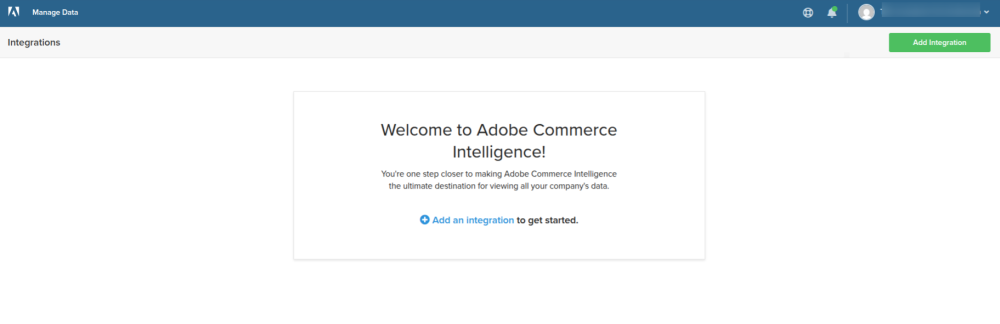
Open the Integrations section.
-
Click Add an Integration to start setup.
Step 2: Add a New MySQL Data Source
-
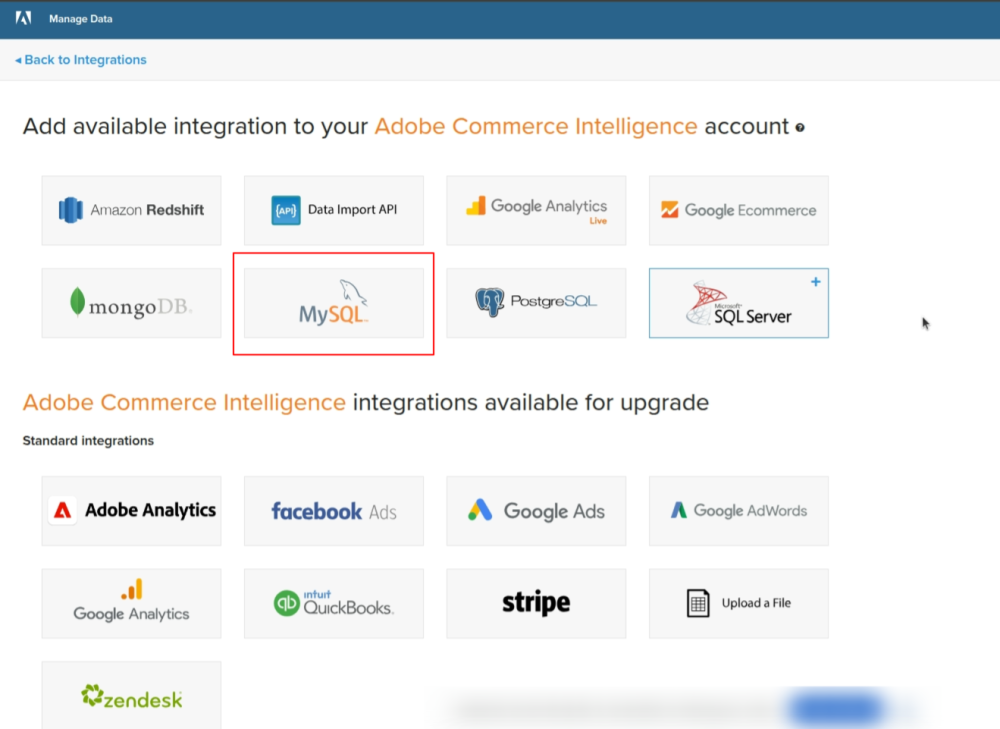
Under “Add available integration,” select MySQL.
-
A new setup screen will appear for MySQL configuration.
Step 3: Enter Your MySQL Database Details
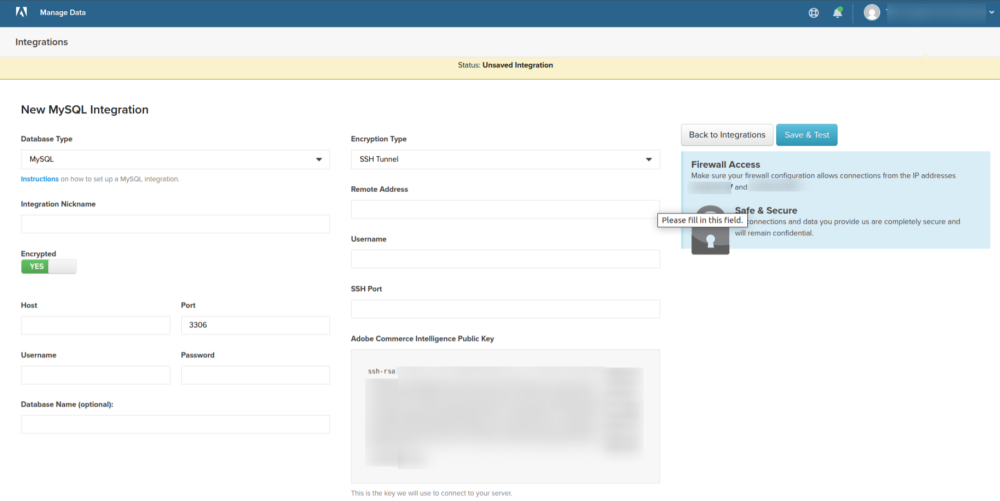
Gather these details from your hosting panel OR Developer team to get from app/etc/env.php file or create read-only user in hosting panel and add credentials:
-
Host (server address)
-
Port (default 3306)
-
Database name
-
Username
-
Password
In the ACI setup:
-
Set Database Type: MySQL
-
Set Nickname: Any name (example: Adobe Commerce Intelligence – Production)
-
Set Encryption: Enabled (recommended)
Step 4: Enable SSH Tunnel (Highly Recommended)
For secure syncing, use SSH.
You can get all the server details directly from the hosting panel.
If you are using Nexcess hosting, follow these steps:
-
Go to Plans.
-
Click on Edit Plan.
-
Select your website (xyz.com).
-
Go to Secure Shell (SSH / SFTP).
-
Click on “Here” to open the details.
-
Now you will see all the server information.
Provide SSH Details in ACI:
-
Encryption Type: SSH Tunnel
-
Remote Address
-
Username
-
SSH Port (default 22)
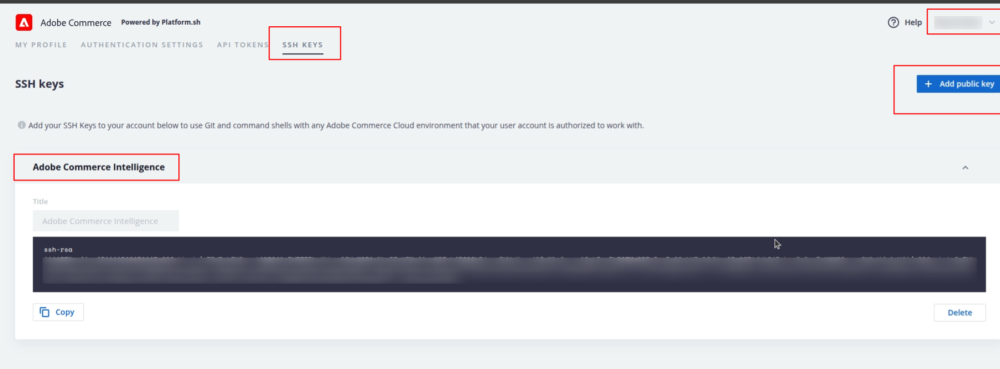
Add ACI Public Key
-
Add a Public key in https://console.adobecommerce.com/-/users/user-name/settings/ssh-keys
-
Login URL: https://console.adobecommerce.com/
-
Username
-
Password
Step 5: Allow Adobe Commerce Intelligence IP Addresses
Your firewall or Cloudflare must allow ACI to connect.
Whitelist These ACI IP(Dummy) Addresses:
-
192.0.2.10
-
198.51.100.25
-
203.0.113.55
If using Cloudflare:
Navigate to:
Security → WAF → Tools → Allow IP
Add each ACI IP address separately.
Step 6: Test the Connection in ACI
After entering all details:
- Click Test Connection
If successful: - Click Save
Data sync will begin shortly, and ACI will start building dashboards using your Magento data.
Step 7: Contact Adobe Support (Optional / If Needed)
If the connection fails or your IP gets blocked, raise a support ticket.
How to create a support ticket:
-
Log in to Adobe Support Portal:
https://experienceleague.adobe.com/ -
Menu: Support → Open Ticket → Add New Case
-
Select a product: Commerce On-Prem
-
Case Title: Connection fails / IP blocked
-
Case description: Add a short description
-
Still need to get in touch with us?
-
Issue Reason: Integration with other Adobe Solutions
-
Environment: PRODUCTION
-
Product Version: 2.4.7
-
Affected URL: Your Domain
-
Select the priority: P2- Urgent
-
Select business impact: Small
-
Time zone: (UTC-5:00) Eastern Time (US & Canada)
-
Add attachments
-
Click on the Submit case button
-
Conclusion
Integrating Adobe Commerce Intelligence with Magento through a MySQL data source gives you:
- Accurate, real-time data
- Powerful dashboards
- Better understanding of customers and sales
- Secure and automated syncing
- Flexible custom reporting
This setup is the foundation for making strong, data-driven decisions for your ecommerce business.
How Evrig Can Help
At Evrig, we can help you set up, optimize, and maintain your entire Adobe Commerce Intelligence integration so you get reliable insights without the technical hassle.
Our team ensures your Magento–MySQL data pipeline is secure, accurate, and fully aligned with your business KPIs.
Whether you need custom dashboards, advanced reporting, or seamless automation, we make sure your data works for you — not the other way around.
From implementation to ongoing support, we provide end-to-end assistance tailored to your ecommerce goals.
If you need support or want to implement this for your store, feel free to contact us — we’re happy to help!