
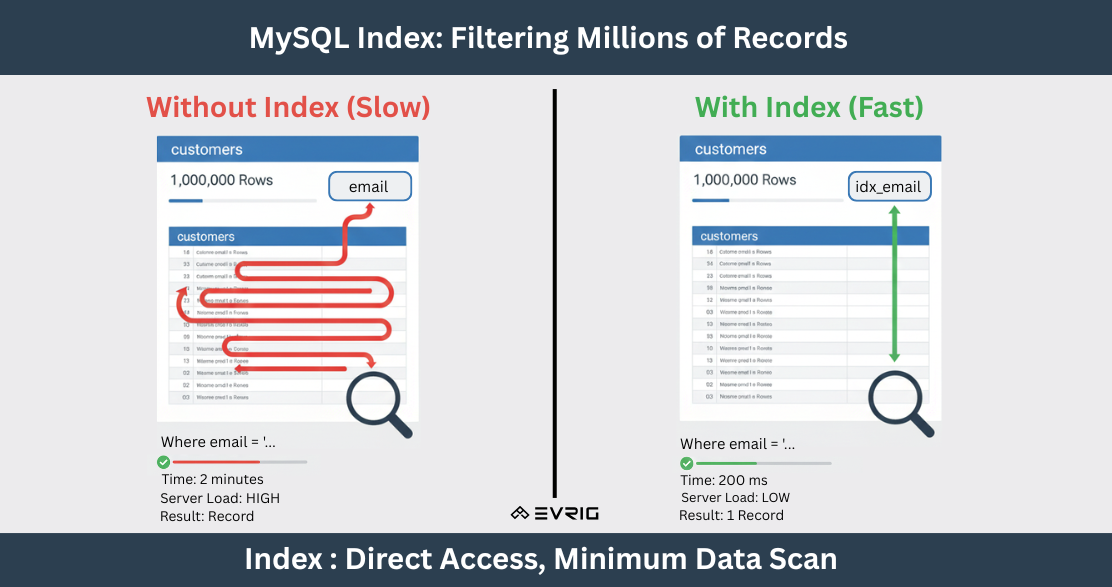
In this blog, we explain how MySQL indexes work and how they help improve your website’s performance.
-
What is index
-
A MySQL index is a pointer that helps MySQL quickly locate data in a table without scanning every row.
-
-
Pros of index
-
Faster SELECT queries
-
Speed up WHERE, ORDER BY, GROUP BY
-
Improve JOIN performance
-
-
Cons of index
-
Slower INSERT/UPDATE/DELETE (because index must update)
-
Use extra disk space
-
Index on low-cardinality columns: Example: gender (M/F), active_status (0/1)
-
Too many indexes: Magento tables sometimes have 10+ indexes → slow writes.
-
Index on very large text columns: VARCHAR(5000), TEXT → not useful.
-
-
How to apply index
-
Normal index
-
CREATE INDEX idx_email ON customers (email);
- Here idx_email is index name, customers is table name and email is field name
-
-
Composite index
-
MySQL uses left-most columns first
-
Searching becomes “city → created_at”
-
This avoids scanning rows from other cities.
-
CREATE INDEX idx_city_date ON customers (city, created_at);
-
Here customers is table Name
-
city, created_at are columns
-
idx_city_date is index name
-
-
Use Cases:
-
-
WHERE city = 'X' AND created_at > ... → YES
-
WHERE city = 'X' → YES
-
WHERE created_at = '...’ → NO
-
ORDER BY city, created_at → YES
-
-
-
-
-
How to Check if Query Uses Index
-
Look for:
-
type = ref or const
-
key = idx_email
-
-
If you see
-
type = ALL → full table scan → index missing.
-
-
- When You MUST Add Index
Situation
Add Index On
Searching with WHERE
Column(s) used
Joining tables
Foreign key
Sorting
ORDER BY column
Grouping
GROUP BY column
High-traffic API
Columns used in read queries
-
Examples
-
Where Example
-
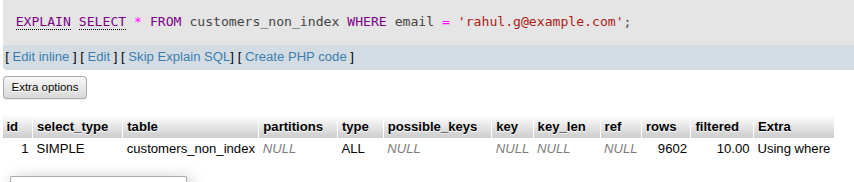
EXPLAIN SELECT * FROM customers_non_index WHERE email = 'rahul.g@example.com';
CREATE INDEX idx_email ON customers (email);
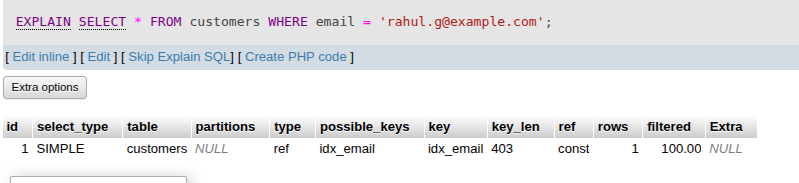
EXPLAIN SELECT * FROM customers WHERE email = 'rahul.g@example.com';
EXPLAIN SELECT * FROM `customers` WHERE `name` LIKE '%Abhishek%' ORDER BY `name` ASC;
-
Explanation:
As you can see in the above images, one table is without an index and the other is with an index. For the WHERE query, the first screenshot (table without index) shows MySQL scanning 9,602 rows just to find one matching record. In the second screenshot (table with index), MySQL immediately locates the record and fetches only 1 row, thanks to the indexed column.
-
-
-
Order By Example
-
SELECT * FROM customers_non_index ORDER BY created_at DESC LIMIT 10;
EXPLAIN SELECT * FROM customers_non_index ORDER BY created_at DESC LIMIT 10;

CREATE INDEX idx_created_at ON customers (created_at);
EXPLAIN SELECT * FROM customers ORDER BY created_at DESC LIMIT 10;

-
EXPLAIN SELECT city, COUNT(*) FROM customers_non_index GROUP BY city;
-
Explanation:
As you can see in the above images, one table is without an index and the other is with an index. For the order By query, the first screenshot (table without index) shows MySQL scanning 9,602 rows just to find one matching record. In the second screenshot (table with index), MySQL immediately locates the record and fetches only 10 row, thanks to the indexed column.
-
-
-