

Black Friday falls on Friday, November 27, 2026, and Cyber Monday on Monday, November 30. A promotion is where your marketing plan meets your store’s configuration, and a small mistake there is visible to every customer at once.
This guide covers Promotions & Black Friday and Cyber Monday Offers, one of the seven areas in our Black Friday and Cyber Monday 2026 Readiness Guide, together with the stock checks that decide whether a promoted product can actually be sold. It sits in the Lock phase, when changes slow down and everything is tested.
Six places a promotion goes wrong
Most promotion problems are not bugs. They are settings that nobody checked together. Give each of these an owner and a date.
| # | Area | What to check | Where it ends to break |
| 1 | Price rules | Catalog price rules, cart price rules, coupons and their priority. | Two rules clash, or a discount stacks when it should not. |
| 2 | Promotional pricing | What the customer sees on the product page, in the cart and at checkout for every price source. | The page shows one price and the cart another. |
| 3 | Start and end dates | The start and end of every promotion, and the time zone they use. | A sale starts hours early or late, or never ends. |
| 4 | Cron and indexers | Cron is running and indexers are up to date, so price changes reach the storefront. | A rule is saved but the old price still shows. |
| 5 | Stock and salable quantity | Salable quantity, stock status and source and stock assignment for promoted products. | A product shows “Out of stock” with stock on hand. |
| 6 | Launch pieces | The promotion category, new products and bundles, set up and tested before launch. | A new bundle or category is missing, empty or hidden. |
Price rules and promotional pricing
- Write down every promotion: what it is, which products, the discount, any coupon code, and the start and end.
- Check the priority of each rule, and whether later rules should stop. This decides whether discounts stack.
- Know which price wins when more than one applies, such as a special price, a tier price, a catalog rule and a cart rule. Then test the result instead of assuming it.
- Test every rule and coupon as a guest and as a logged-in customer, on the product page, in the cart and at checkout.
- Check usage limits on coupons, so a code does not run out or stay open longer than planned.
Scheduling: start and end dates
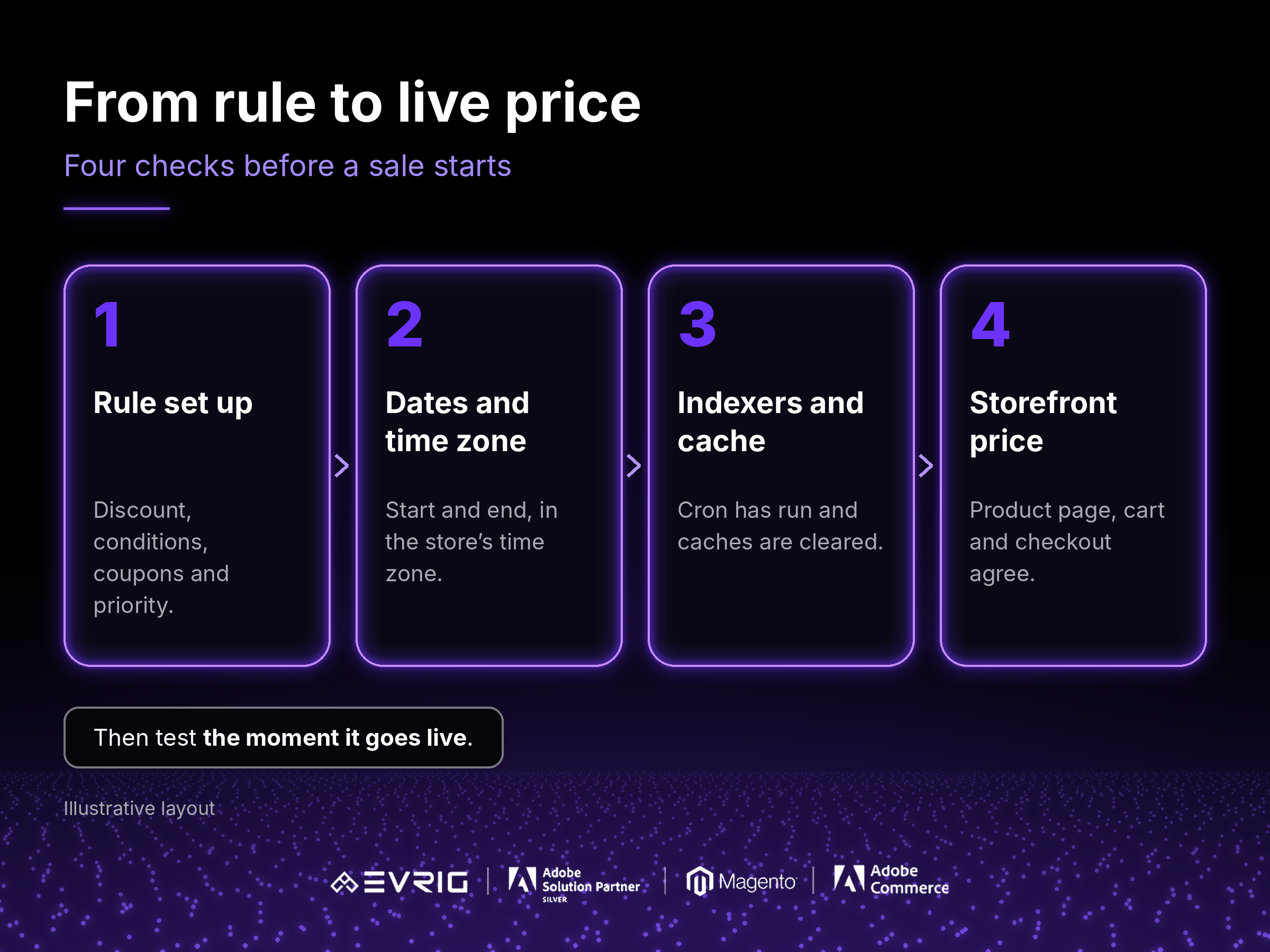
- Set the start and end of each promotion, and check which time zone they use. Midnight in the store’s time zone may not be midnight for your customers.
- Check the end date as carefully as the start. A promotion that does not end can cost more than one that starts late.
- Confirm cron is running and indexers are up to date. Many price changes only reach the storefront after they run, and caches may need clearing.
- Decide who is allowed to change a promotion once the freeze begins, and who approves it.
Stock status and salable quantity
A product can have stock in your warehouse and still show “Out of stock”. Where Multi-Source Inventory is in use, quantity and salable quantity are different numbers. Salable quantity is what you can sell right now. It takes into account stock already reserved by orders that have not shipped, and any out-of-stock threshold you have set.
- Check salable quantity for your best sellers and for every promoted product, not only the quantity shown in admin.
- Check the stock status is “In Stock”, and that the product is assigned to the source and stock that your website uses.
- Check that your inventory sync with an ERP or order system is running, and that it does not overwrite stock with old numbers.
- Set up new products, bundles and the promotion category early, and test that they are visible and can be bought.
Hypothetical example: you check a best seller and admin shows a quantity of 12. Twelve units are already reserved by open orders, so the salable quantity is 0 and customers see “Out of stock”. Nothing is broken. The number you looked at was the wrong one.
The midnight rehearsal
Hypothetical example: a sale is set to start at midnight on Friday. At midnight, nothing changes. The rule is saved, but cron had not run, so the old price still shows. By the time someone notices, the busiest hour has passed. Rehearse this before the freeze:
- Create a test promotion for a test product, set a start a few minutes ahead, and watch what happens at the start and at the end.
- Check the price on the product page, in the cart and at checkout, in a clean browser session.
- Ask who would be watching at the start of the real sale, and who could fix it.
Running this in November takes an hour. Finding out at midnight on Black Friday is much harder.
Adobe Commerce vs Magento Open Source
Scheduling: Adobe Commerce includes content staging, which lets you schedule changes to products and price rules to go live and end at set times. On Magento Open Source, price rules and special prices have their own start and end dates instead. Check which one applies to your store and how it behaves.
Inventory: Multi-Source Inventory is part of both, but check how it is set up on your version and which stock your website uses.
Testing: On either edition, test the real result on a copy of your store before the freeze.
Details can vary by version and plan, so confirm against current Adobe documentation.
A pre-freeze checklist
- Is every promotion written down with its start and end date, time zone and approver?
- Has each price rule and coupon been tested as a guest and as a logged-in customer, on the product page, in the cart and at checkout?
- Do you know which price wins when more than one applies?
- Are cron and indexers running, so rule changes reach the storefront?
- Has someone rehearsed the moment the sale starts and the moment it ends?
- Do promoted products show a salable quantity above zero, with the right source and stock?
- Are new products, bundles and the promotion category set up and tested before the freeze?
How Evrig can help
Evrig works with Adobe Commerce and Magento Open Source merchants on promotions, performance and readiness. If you would like a second pair of eyes on your store before Black Friday and Cyber Monday, get in touch and we can help you check these before code freeze. Get In Touch